
Declaration and Confirmation of Payment for 2025
You only need to submit this form ONCE. Once you have signed and submitted, scroll down for more instructions below.
PLEASE BE PATIENT AFTER CLICKING SUBMIT. The form submission may take longer than you expect. You will receive a notification above, highlighted in green, once the submission is successful and a copy of your responses will be sent via email.
If you do not see the confirmation of submission or receive the email, your form has not been submitted successfully.
Word Count
Word count is important and this year all content must comply with the word count limits. There are easy online tools to gauge word count. https://wordcounter.net/ and https://wordcount.com/ are just two that can be accessed for free. Note that if you want more complex driving directions in the brochure, you may have to sacrifice social media references. Think about what information is most important on the brochure as it relates to your studio.
Your brochure content from last year can be copied from the brochure PDF and pasted into one of the wordcount tools listed above to help you craft just the right submission.
Images
Uploading huge images to the website increases the likelihood of the submission process failing. Furthermore there is no advantage to uploading images larger than what can be comfortable displayed on a standard computer screen. For this reason we suggest that the “short side” of the image be kept around 1000 pixels. Adobe – a popular software producer has a decent image resizing tool online and we encourage you to use it to assist with your image submissions. https://www.adobe.com/express/feature/image/resize
Once you have uploaded an image to the site, you will see the dimensions and the file size listed to the right, like this…
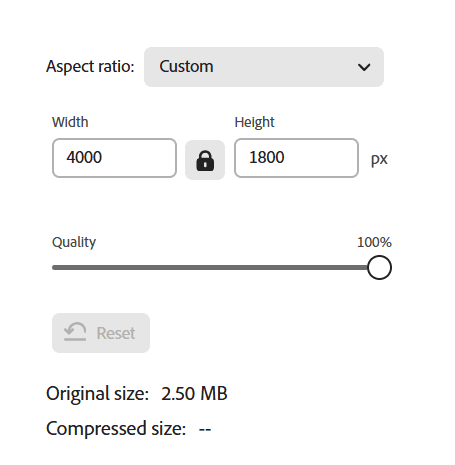
In my example, the short edge is 1800 and and the long edge is 4000. I will change the 1800 to 1000 and move the quality slider to 80%.
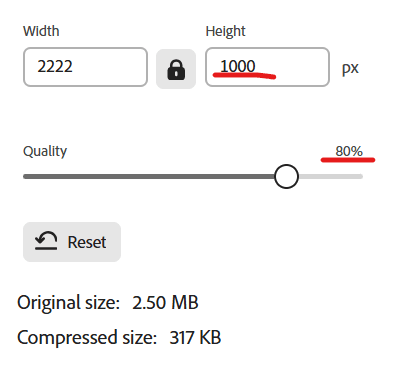

The Quality Compare button allows you to switch between the Original image and the resulting image. On a screen, 80% is ample and most website will automatically reduce the quality to 80% anyway.
Once you have made your changes you can download the result and save it to your computer. NEVER overwrite your original images with the download
How to Update your Content
Using the links below, navigate to your content page. Once there, scroll down to find the form with your details already filled in. Make your changes and click submit. You can revisit and change this as often as you want until the deadline. Once the deadline passes, you will no longer have access.
YOU MUST CHANGE YOR THUMBNAIL!! With all of the image fields, the X will remove an image and allow you to replace it with a new one. Since several of these image fields are limited to a single image, you MUST remove the existing image before you can upload or choose the new image. An attempt has been made to give you access to all the images that have been been uploaded in the previous year. During the upload process there is a tab for Media Library where you will find some or all of your existing images as well as any new images you upload. IF you have difficulties or are interrupted while adding your content, please view this tab and check if an image exists in the library already before uploading it a second time.
- AquaRose Gems and Minerals
- Canada in the Wild
- Fraser Knives
- Hill Pottery
- Jessica Lin Photography
- Joyce Burkholder Artist
- Kelly MacLeod
- Lesha Kokosky
- Linda Sorensen
- Little Creek Pottery Studio
- Mike Desrochers
- Mystic Mud Creations – guest
- Northern Viking Farm
- Northernwood Studio
- Rrijoice Tie-Dyes
- Seed and Stone Workshop
- Spark Pottery
- Tanya Lyons Glass
- The Herd’s Throne
- The Loom Room – guest